Map Notes
Similar to Foundry's core map notes that allow you to create a note to easily open a journal entry, Worldbuilder allows you to create a map note to open a Worldbuilder article.
Map notes to Worldbuilder articles can be configured to:
- Open a specific article
- Open a specific page within an article
- Open a specific page within an article and scroll to a specific heading
Creating Map Notes
There are 3 ways to create a map note:
- Creating a normal map note (just like you would for a journal entry), and configuring it for Worldbuilder
- Dragging an article from the main application onto the canvas
- Dragging an article's page or heading onto the canvas
In all cases, the map note configuration window will pop up.
Map Note Configuration
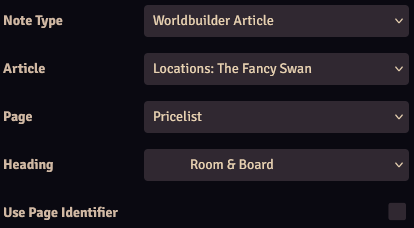
Worldbuilder adds multiple settings to the map note configuration. Only Note Type will always be visible, the other settings will appear when they're relevant.
| Setting | Description |
|---|---|
| Note Type | Configure the note to link to a journal entry or a Worldbuilder article |
| Article | Article to open (only visible if Note Type is set to Worldbuilder Article) |
| Page | Page to open (only visible if an article is selected) |
| Heading | Heading to open (only visible if a page and article are selected, and the page has headings) |
| Use Page Identifier | Use the page identifier to create a note instead of a normal icon, see here (only visible if a page and article are selected) |
Page Identifier Map Notes

For normal map notes you can select an icon that is displayed on the canvas. If an article links to a specific page, you can choose to replace the icon with the page identifier. This will create a circle with the configured identifier in the center.
See the 2 map notes in the image, with a normal icon on the left, and a page identifier icon on the right. In this case, the page's page identifier is set to D1.
You can customize the page identifier note in the map note configuration with: * Icon Size: Sets the size * Icon Tint: Sets the color of the circle * Text Color: Sets the color of the text within the circle